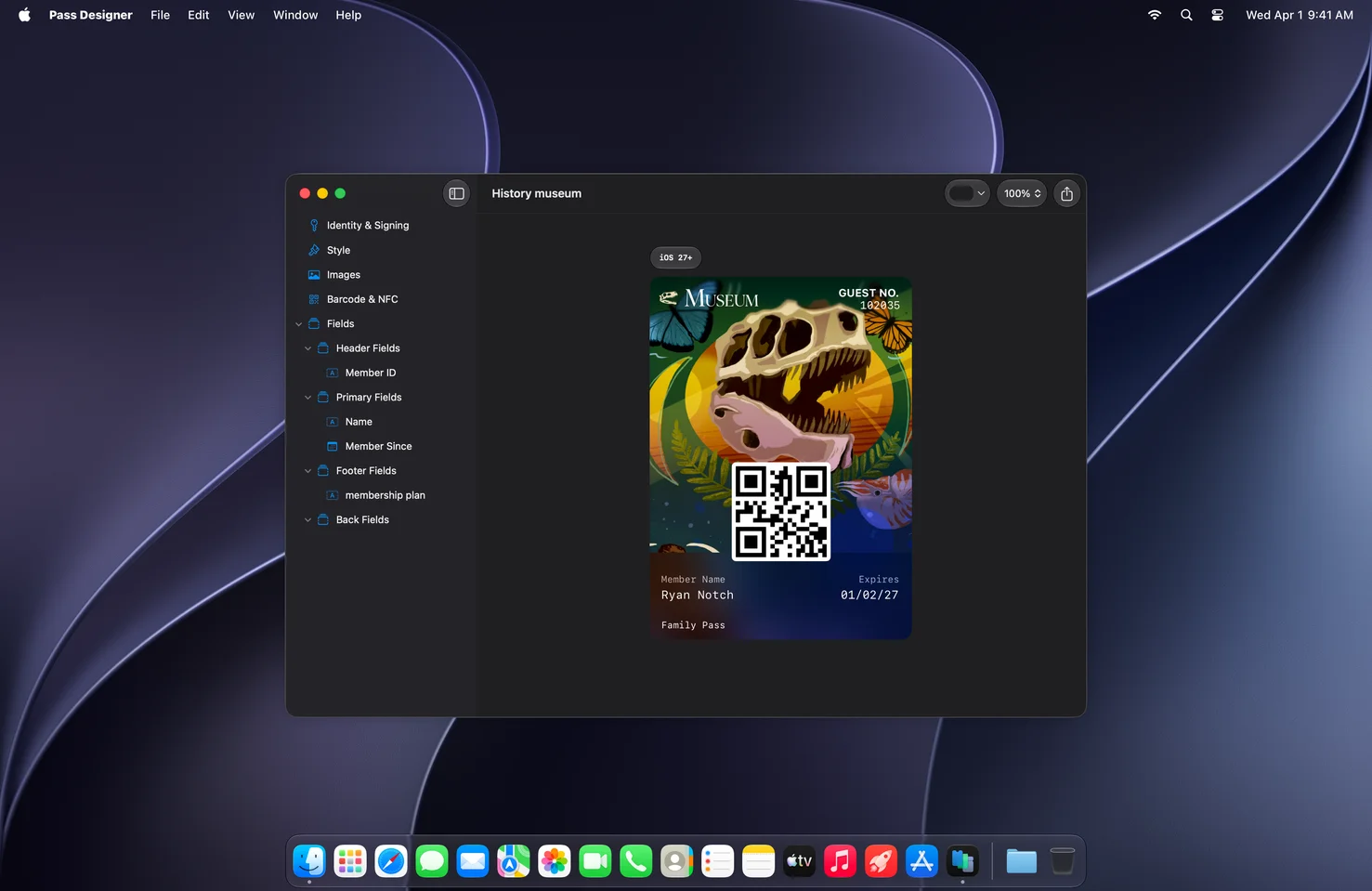
Apple’s Pass Designer is a new Mac app for designing and previewing Apple Wallet passes. Available as a beta requiring macOS 27 or later, it gives developers and businesses a visual way to build pass templates, check how they appear on Apple devices, and catch common definition problems while working. Its focus is the design and structure of a pass—not the full process of creating and distributing every personalized pass a service may need.
That distinction matters. Pass Designer creates template files, while Apple’s separate Pass Builder package is intended to turn templates into personalized, signed passes. Used together, the tools describe a workflow that connects visual authoring on a Mac with pass generation in server-side or command-line environments.
Start with a pass type or a blank design
Pass Designer supports six pass types: boarding pass, coupon, generic, store card, event ticket, and poster generic. A type provides a starting structure and standard fields relevant to the pass. You can edit those fields directly in the app, or begin with a blank pass or from scratch when a preset is not a good fit.
The app accepts templates supplied by Apple as well as templates of your own. Artwork can be made in a preferred design tool and brought into Pass Designer; examples include logos, backgrounds, and strip images. This division of labor is useful for teams that already have a visual design process: image creation can stay in familiar tools, while Pass Designer handles pass-specific fields, appearance, and validation.
Preview the pass as you edit
The central feature is a live preview. As you change the pass, Pass Designer updates its rendering to show how it will appear on iPhone and Apple Watch. Apple describes the preview as using the same rendering as iOS and watchOS, so designers can inspect the presentation without relying solely on a static mockup.
The app can also visualize how a pass appears across different software versions. That makes version-aware review part of the design process: a team can consider newer Wallet capabilities while still checking the experience for software versions that may not support them. The point is not simply to make a pass look polished in one idealized view, but to examine its presentation across the supported environments.
Pass Designer also provides controls for background, foreground, and label colors. Combined with editable standard fields and imported artwork, these controls make it possible to shape the pass’s visual identity and information hierarchy in one place. For a business, that can help keep a pass aligned with its existing brand; for a developer, it provides a direct way to see how field content and styling work together.
Validation during authoring
Pass Designer validates a pass as you work and alerts you to issues such as missing required key values and unexpected definitions. This is valuable because visual review alone cannot establish that a pass has the expected structure. Catching these problems during authoring gives designers and developers an opportunity to address them before a template is used in a larger pass-generation workflow.
Validation should be treated as an authoring aid, not as a substitute for checking the complete production process. Pass Designer’s role is to edit and validate the design template. Pass Builder, by contrast, provides a Swift API and the buildpass command-line executable for turning templates into personalized, signed passes. The package runs on Mac and Linux, making it the part of the toolset designed to connect templates with automated generation.
Semantic tags add structured meaning
For boarding passes and event tickets, semantic tags let a pass express structured information in addition to its visible fields. Examples include flight details, event dates, and venue locations. Systems can use that data to enable features such as Siri Suggestions, Calendar integration, and Maps directions.
Pass Designer lets authors edit semantic tags in its interface and compare a semantic pass with a non-semantic version side by side. The documentation identifies semantic-tag support for boarding passes in iOS 27 and later and event passes in iOS 18 and later. That difference makes it important to consider the pass type and the software versions its audience may use rather than assuming every semantic feature is available everywhere.
To help with compatibility, Pass Designer can automatically generate a backward-compatible pass structure from semantic data. The generated structure does not require semantic tags, allowing a pass to provide a compatible representation where those tags are not supported. This gives authors a way to maintain structured, feature-rich data for supported systems while accounting for older environments.
A practical workflow
- Choose a starting point. Select one of the six pass types, use an Apple-provided or existing template, or begin with a blank pass.
- Prepare the artwork. Create assets such as logos, backgrounds, or strip images in your preferred design tool, then bring them into the pass design.
- Set fields and appearance. Edit standard field content and adjust background, foreground, and label colors while reviewing the live device preview.
- Add structured data where appropriate. For boarding passes and event tickets, edit semantic tags and review the semantic and non-semantic representations. Consider the relevant iOS support versions.
- Review validation and compatibility. Address reported definition issues and inspect the pass across software versions before using the template downstream.
- Generate personalized passes separately. Use Pass Builder when the task is to turn templates into personalized, signed passes through its Swift API or
buildpasscommand-line tool.
Who should explore the beta?
Pass Designer is relevant to developers building Wallet integrations, designers responsible for pass presentation, and organizations that issue passes for services such as transportation, events, retail, or membership. Its live preview and validation address two different parts of the work: what customers see and whether the pass definition has expected values. Semantic-tag editing adds another dimension for pass categories where structured data can power system features.
The beta requires macOS 27 or later. Apple’s download instructions call for signing in with an Apple Account and, if prompted, completing free registration and accepting the Apple Developer Agreement. Teams should also keep the boundary between design and generation clear: Pass Designer is the visual template editor, while Pass Builder handles the programmatic creation of personalized, signed output.
Together, the tools offer a more complete approach to Wallet pass development. Pass Designer makes the template easier to shape and inspect; Pass Builder provides a route to generate finished passes from that template. For teams creating passes intended to work across devices and software versions, the combination encourages a workflow that includes visual review, structural validation, and compatibility planning from the start.