

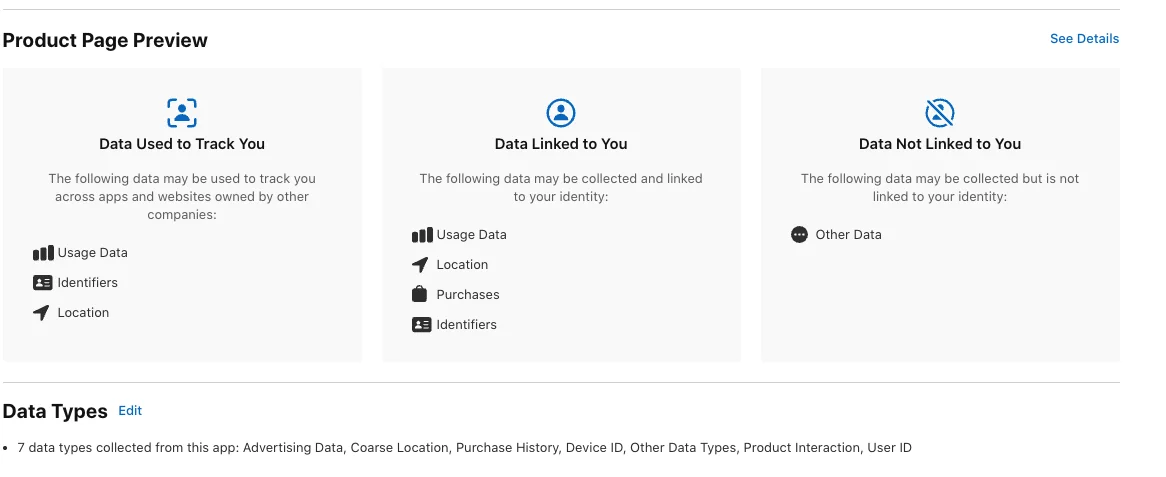


When you submit an iOS app that shows AdMob ads, App Store Connect asks you to describe what data the app collects. The questionnaire feeds the privacy "nutrition label" on your App Store page, and many developers find it confusing because most of the data is collected by code they did not write.
This article explains why AdMob changes your answers, how to work through the questionnaire step by step, and which related settings (App Tracking Transparency and Google's consent tooling) must match what you declare.
Why AdMob Changes Your Answers
Apple's rule is that your answers must cover your app's own data practices and those of third-party partners whose code is integrated into the app. An ad SDK (software development kit, a library you add to your app) is exactly that kind of partner. Whatever the Google Mobile Ads SDK collects counts as data collected from your app.
The option "No, we do not collect data from this app" is only valid if neither you nor any third party collects data. An app with AdMob will almost never meet that condition, so you should expect to declare data types.
Apple also says the answers apply at the app level, should reflect practices across all platforms, and must be updated whenever your practices change. Adding or removing an ad network, or switching on a new AdMob feature, is a reason to revisit the form.
What you do not need to declare
Apple notes that data sent to a server call but not retained, or discarded immediately after servicing a request, does not need to be disclosed. Do not rely on this for ad SDKs unless you can verify the partner's behaviour, because ad networks generally exist to use the data they receive.
Working Through the Questionnaire
Start from Google's own documentation for the Mobile Ads SDK, which describes the data the SDK handles. Treat it as the baseline for the third-party half of your answers, then add anything your own code collects, such as accounts, purchases or analytics. Check the current version of that documentation, because SDK behaviour and Google's guidance change over time.
For every data type you declare, Apple asks the same set of questions:
- Is it collected? Answer yes if either you or a third-party partner collects it.
- Is it linked to the user? You must say whether the developer or a third-party partner links the data to the user's identity, for example through an account, device or identifier.
- Is it used for tracking? Apple treats data used for targeted advertising, or shared with others for that purpose, as tracking.
- What are the purposes? Typical choices include third-party advertising, analytics, app functionality and developer's advertising or marketing.
If AdMob serves personalised ads in your app, the advertising-related data types will normally be declared as collected and used for third-party advertising. Whether the answer to the tracking question is yes depends on how the data is used, so read Google's current guidance rather than guessing. Apple's own example makes the logic clear: a login SDK that repurposes collected data for targeted advertising in other developers' apps means that data counts as linked and used for tracking.
Do not forget the privacy policy. Apple's App Review Guidelines require it to identify what data you and your third parties, including advertising networks and third-party SDKs, collect, how it is collected and how it is used. It must also cover retention and deletion, and explain how users can revoke consent or request deletion.
Keeping Tracking, Consent and Labels Consistent
If you declare tracking, your app has to behave accordingly. That means showing the App Tracking Transparency (ATT) prompt, Apple's system dialog that asks permission to access the advertising identifier (IDFA). To show it, add NSUserTrackingUsageDescription to Info.plist with a clear explanation for the user.
<key>NSUserTrackingUsageDescription</key>
<string>Your data is used to deliver more relevant ads.</string>
<key>GADApplicationIdentifier</key>
<string>YOUR-ADMOB-APP-ID</string>
Google recommends waiting for the authorization callback before loading ads, so the SDK can use the IDFA if the user grants permission. A minimal request looks like this:
import AppTrackingTransparency

func requestTrackingThenLoadAds() {
    ATTrackingManager.requestTrackingAuthorization { status in
        DispatchQueue.main.async {
            // Start the Mobile Ads SDK and load ads here,
            // after the user has answered the prompt.
        }
    }
}
If the user denies permission, ads can still be requested, but the Google Mobile Ads SDK will not send the IDFA in the ad request. Your App Privacy answers still describe what the app may collect, so a denial does not remove the need to declare it.
Using Google's consent tooling
Google's User Messaging Platform (UMP) SDK helps manage user privacy choices. To show an IDFA message through UMP, first complete the UMP getting-started steps and create an IDFA message in the AdMob interface. Setup also involves adding the AdMob application ID to Info.plist. After requesting consent information, check UMPConsentInformation.sharedInstance.privacyOptionsRequirementStatus to decide whether to offer users a privacy-options entry point, such as a button in settings.
Before submitting, run a short consistency check:
- The declared data types match the SDK versions currently in your build.
- If you declared tracking, the ATT prompt and its
Info.plisttext are present. - The privacy policy mentions AdMob and describes retention, deletion and consent revocation.
- Any consent flow in the app reflects your actual ad configuration.
Conclusion
For an app with AdMob, the App Privacy form is a joint disclosure covering your code and Google's SDK. Use Google's documentation as the baseline, answer the collected, linked, tracking and purpose questions for every data type, and keep your privacy policy and ATT setup in line with those answers.
Revisit the form whenever you update the SDK or change your ad setup. Accurate, current answers are the simplest way to avoid review problems and to give users a truthful picture of your app.